4258 stories
·
5 followers

The Seven Coolest Inventions From 'DEF CON' 2026

1 Share

DEF CON, the annual hacker convention held in Las Vegas, Nevada, just concluded its 2026 event. Between the convention’s Main Stage talks, vendor floors, and Demo Labs displays, this year’s event displayed some amazing feats of anti-surveillance technology built by open-source and independent developers or cybersecurity experts. 

There’s a device that detects nearby Flock cameras, an encrypted handheld device for sending texts without relying on carrier networks or the internet, a risk calculator for third-party web browser extensions, and an advanced spyware detector for smartphones. I spent my weekend analyzing all of them, going through reams of on-the-floor footage and announcement pages. These are the things that struck me as most interesting. 

Flock You and OUI-SPY by Colonel Panic

OUI-SPY detector by Colonel Panic
OUI-SPY is an ESP32 microcontroller pre-loaded with Colonel Panic's Flock camera detection firmware Credit: Colonel Panic

Flock Safety’s automated license plate reading (ALPR) cameras have been the focus of every cybersecurity and surveillance conversation in 2026. They quietly scan license plates to send out automatic alerts to law enforcement and federal agencies, with the advertised goal of cracking down on criminal activity. However, that's not always the case: Reports show law enforcement has used Flock data to track immigrants and people potentially seeking abortions, as well as spy on partners and romantic interests

A very interesting gadget to come out of DEF CON 2026 is this technology developed by a DIY hardware enthusiast who goes by “Colonel Panic.” It’s a lightweight firmware called Flock-You that can be installed on any ESP32 microcontroller.  You buy an ESP32 chip for $10 to $15, load the firmware onto it, and use it to listen for wireless signals that alert you when a surveillance camera like Flock is nearby. If you don’t want to bother yourself with the DIY setup, Colonel Panic also sells packaged ESP32 boards with the Flock-You firmware pre-loaded into them. These are called OUI-SPY detectors, and you can get them for as little as $85 apiece.

There are a few caveats, like how the Flock-You firmware won’t work on Arduino or Raspberry Pi microcontrollers because they are tuned into the ESP32’s specific wifi and Bluetooth infrastructure. Also, Flock cameras are already being adjusted to evade this detection technology, so it will probably only work on older or unpatched models. 

The Biscuit Ultra by Hedge

Biscuit Ultra anti-surveillance hotspot's software UI
Biscuit Ultra is the Swiss army knife of anti-surveillance devices, with WiFi scanning, Flock camera detection, follower alerts Credit: Biscuit Shop

If there was ever a Swiss Army knife of anti-surveillance tech, Biscuit Ultra is probably it. This is a handheld device designed by a hacker known as Hedge that scans nearby wireless signals for several telltale signs of surveillance tech in your vicinity. Then it will feed you information like: 

  • A list of all nearby wifi networks

  • Flock or Axon cameras in your range

  • If the same device or gadget keeps popping up everywhere you go

Of the three features, I think the third one is probably the most useful of the bunch. You’ll get automated alerts if the same smartphone, tracker, or GPS device is following you around over time, which is a good indicator of whether you’re being actively tracked without your knowledge. The device is designed to look inconspicuous, like a small handheld router with two swivel antennas. Right now, a single unit costs about $160 on the Biscuit Shop.

Rayhunter by the Electronic Frontier Foundation (EFF)

Rayhunter project by the Electronic Frontier Foundation
Rayhunter, designed by the EFF, is an open-source platform that can detect 'Stingrays' Credit: The Electronic Frontier Foundation

Law enforcement officials in the United States use devices called IMSI-catchers (nicknamed “Stingrays”) that can track cellphones by pretending to be a cell tower. They send out strong signals that phones mistake for a real tower, which leads them to disconnect from the local tower and connect to the catcher instead. Once connected, Stingrays can track your real-time location and call logs without anyone the wiser. It’s a technique commonly used by local police departments, the FBI, and ICE, for example. Worse still, when these devices are active, they catch stray data from all other cellphones in the vicinity, even if their owners weren’t persons of interest in an investigation. 

Federal agents are required to obtain a search warrant before deploying these tools except in "exigent circumstances," but that likely isn't enough to preserve the general public's privacy. The Electronic Frontier Foundation has developed a new tool called Rayhunter to detect any suspicious towers that could be Stingrays in the vicinity. It runs on any off-the-shelf mobile hotspot, which the EFF says can cost as little as $20. You simply load the EFF’s free software into the hotspot, and it lights up red if there’s any suspicious tracking behavior from nearby towers. 

The Hacker Pager by Exploitee.rs

The Hacker Pager handheld device by Exploitee.rs
The Hacker Pager is a retro-style handheld device with a screen and keyboard, designed to transmit texts over short-distance radio waves Credit: Exploitee.rs

Exploitee.rs is a cybersecurity research group that specializes in IoT security, home automation, entertainment devices, and smartphones. They built a radio communication device called The Hacker Pager, which looks like a retro-style handheld smartphone with a screen and mechanical keyboard.

Unlike cellphones, The Hacker Pager does not rely on cell towers or internet connectivity. This low-tech gadget uses radio waves that transmit from device to device instead, based on an open-source firmware called Meshtastic. With the 2026 firmware update, Exploitee.rs’ device now supports external Bluetooth keyboards, multichannel communication, and more customization options for things like notification sounds. While secure, it’s not very long-distance, because the signals only travel up to thirty miles—assuming that there's a clear line of sight with no obstructions. 

Phasmid by Mr. Rabbit

Phasmid installed on a Raspberry Pi Zero
Phasmid is an open-source Python app that can be installed on a Raspberry Pi to create a dual-slot concealed storage system Credit: Makoto Sugita

This one’s still a prototype, but it’s worth a look anyway for the idea alone. Makoto Sugita, or “Mr. Rabbit,” showed off a deniable storage system that can create a fake version of your local file storage. That way, you can keep confidential data hidden from the people around you. 

Phasmid is an open-source Python app that can be installed on a device that splits your local storage into two slots—one real, and the other a fake version that you designed with your sensitive data removed. When someone tries to physically coerce you into handing over your device, Phasmid pulls up a “safe” version of your local storage that has all the sensitive data scrubbed from it, without revealing anything else. 

Since it’s only a prototype, Phasmid can only be installed on Raspberry Pi devices for now, and a macOS version is currently under development. It’s more of a proof of concept as it stands, but an interesting look at a tool that solves a specific problem that not a lot of technology is designed to secure against. 

L.A.Y.E.R.S. by Abhinav Khanna and Krishna Chaganti

L.A.Y.E.R.S. project's GitHub page
L.A.Y.E.R.S. is a client-side platform that scans your browser for malicious extensions Credit: Abhinav Khanna and Krishna Chaganti

Fake extensions with security issues have been a recurring concern for web browsers. Many of these extensions also pretend to be ad blockers or coupon finders, quietly tracking your online activity, logging keystrokes, or switching on your mic and webcam. Most people don’t even notice such a thing until they receive a ransom email or end up in a data breach. L.A.Y.E.R.S., designed by cybersecurity researchers Abhinav Khanna and Krishna Chaganti, scans your currently installed browser extensions to assign each a risk score based on their behavior patterns. 

L.A.Y.E.R.S. is currently available as a downloadable package on GitHub. It runs locally on your web browser, without sending any data to third-party platforms via API. Every browser extension you have installed gets scanned for suspicious permission requests, malicious JavaScript or HTML, risky external endpoint URLs, and other common patterns among malicious plugins. You end up with a simple risk score that grades each extension between one and 100, with lower scores indicating a higher security risk. 

IsMyPhonePwned by Anthony Desnos

IsMyPhonePwned.com's dedicated spyware detection tool
IsMyPhonePwned scans your iOS or Android smartphone over WebUSB for spyware Credit: Anthony Desnos

IsMyPhonePwned offers an answer to the question: “What should I do if I think my phone has spyware on it?” Normally, you’d be forced to employ expensive forensic cybersecurity experts or pay for an antimalware platform like BitDefender or Norton. But Anthony Desnos developed IsMyPhonePwned as a free alternative to expensive spyware detectors that require you to install a cumbersome app on your phone which would also give away your suspicions to the attacker. 

Desnos’ tool is a web application you can run from your desktop PC. You connect to your compromised smartphone over USB, and IsMyPhonePwned generates a bug report for you. You can run this check on both Android and iOS devices. If you suspect a specific app of being spyware, there’s also a tool here called droid2web that can scan Android app packages separately.

Read the whole story
j_k
15 hours ago
reply
Share this story
Delete

Pocket Scion is a synth you play with plants

1 Share

A few years ago, artist Modern Biology became a viral sensation when he posted videos of himself controlling a modular synth with mushrooms on TikTok. Pocket Scion gives anyone similar capabilities, but without having to spend thousands of dollars on a Eurorack rig – and in a much more portable package. 

A core part of Modern Biology’s setup is a module called Scion from Glasgow-based Instruo. Scion turns biofeedback, whether that’s from houseplants or your own skin, into CV (control voltage) for controlling other synth modules in a larger setup. Touching two sensors to your hand or a mushroom completes a circuit, and then electrical fluctuations in that circuit can be used to trigger different notes, or change the cutoff on a filter, for instance.

A little over a year ago, he approached Instruo about building something new. The fruit of that collaboration is the Pocket Scion, an affordable self-contained instrument that can turn small electrical changes from living organisms into MIDI data and create soundscapes using one of the four built-in sound engines. 

The Pocket Scion has a number of advanced capabilities too, including MIDI out for controlling external instruments. There’s also a companion app for Windows, macOS, and Linux that exposes sound design tools for creating your own synth patches, and can send data over Open Sound Control (OSC), which gives it control over a ton of audio and video programs like Max/MSP, Pure Data, and Unreal Engine for creating visualization or complex reactive art installations. It’s more powerful than you’d expect given its $149 price.

The initial run of Pocket Scions sold out almost immediately. But you can place a preorder for when the next batch ships “early next week,” according to retailer Control Voltage.

Read the whole story
j_k
361 days ago
reply
Share this story
Delete

cleverwordsandotherstuffilike:

2 Shares
Read the whole story
j_k
375 days ago
reply
Share this story
Delete

Google Gemini can now read your Docs aloud

1 Share

Google Docs will now let you generate an audio version of your documents using AI. In a post announcing the rollout, Google says you can customize Gemini’s AI audio output with different voices and playback speeds.

This feature isn’t just for a document’s creator, as Google says readers can access a shared document’s AI-generated audio by selecting the Tool dropdown menu and selecting Audio > Listen to this tab. Authors can also add a customizable audio button directly in a document by choosing Insert > Audio, which readers can click to start listening.

Google announced plans to let you turn your documents into AI podcasts in April, but this feature seems a lot handier if you just want to listen to what you’ve written. You can only generate audio versions of documents in English and on desktop devices for now.

Google is rolling out audio in Docs to Workspace users with business, enterprise, or education plans, as well as users who have AI Pro and Ultra subscriptions.

Read the whole story
j_k
379 days ago
reply
Share this story
Delete

YouTuber Hank Green’s Focus App Just Overtook ChatGPT on the App Store

1 Share

Focus Friend is a cute focus timer app from YouTuber Hank Green that recently came out of nowhere to dominate the US App Store charts. It’s currently the number 1 app in the Top Free Apps category, beating even the ChatGPT app. So, what's the big deal?

Basically, the app gives you a friend, a cute little bean that knits for you as you go about focusing on your work. All it really wants is to knit you some socks, but it can't do that if you're on your phone all the time. Won't you focus a bit as your friend knits for you?

A Pomodoro timer, but cuter

Setting Focus Friend timer.
Credit: Khamosh Pathak

Focus Friend (available for both iPhone and Android) is essentially a Pomodoro app, where by default, you focus for 25 minutes, then take a 5 minute break, then repeat. But as with most Pomodoro apps, you aren't limited to those numbers, so when you start a timer, you can choose any timeframe up to 120 minutes.

Starting out, you’re met with a cute little bean character that you can name whatever you want. As you start the timer, the bean goes to work and starts knitting socks for you. The kicker? It really doesn’t want to be disturbed. This is your time to get to work, too. Think of it as body doubling with your virtual bean.

The app also plays some nice funky music in the background (a nice change from the usual lo-fi music found in productivity apps). But by default, it stops playing if your screen turns off. If you want to keep listening to the music (as I did), you’ll need to enable that feature from the Settings menu.

You are free to cancel your timer at any time, but if you do, you'll get a guilt-inducing popup asking if you're really sure. Your bean will also get sad, but don't worry, it'll be hopeful for your next session.

At the end of the timer, your bean companion will present you with knitted socks to add to your collection. The longer the timer, the more the socks (my latest 30 minute session netted me 26 socks, not to brag). Once you’ve collected enough socks, you can trade them in to buy things to decorate your place. You can buy a nice table, wall art, furniture, or even a different skin for your bean. Expect it to take some time, though, to decorate your entire room, since a simple rug costs 75 socks and prices just go up from there.

But perhaps that itself is the point? As you use the app more and more, you’ll be able to focus more easily, and slowly decorate a cute little home for your cute little bean.

Visual gamification, and tangible progress

Focus Friend store for decoration.
Credit: Khamosh Pathak

The Pomodoro method is a proven approach, and this is certainly a cute way of doing it. And if you're thinking you could just cheat by swiping away to another app, there’s also a Deep Focus mode that integrates with Screen Time features to lock them away. Just be careful about using Screen Time features in the free version of Focus Friend, as they'll locks you out of basically every other app on your phone. To allow specific apps, you’ll have to pay for the premium version, which costs $1.99 per month, $14.99 for a year, or $29.99 for a lifetime subscription.

The Pro upgrade also lets your companion knit scarves, and gives you three times the socks output. Your virtual bean is customizable in the Pro version as well. You can pay to unlock a skin that looks like Hank or John Green, a jelly bean, or even a coffee bean.

But if you’re at least slightly dedicated, you can still get by using the free version. I, for example, use the Session app for my Pomodoro needs. It’s a sleek Mac app that costs $40/year (similar to the Focus Timer app that my colleague Justin Pot uses). But I pay the price because it keeps me focused when it really matters, as I’m writing these articles. Using Focus Friend today had me really questioning if that subscription is necessary.

There is a downside to the app's simple appeal, though. Focus Friend is only available on iPhone and Android, and free version or no, there are no “pro” level features here like a dashboard, custom presets, notes, or past statistics.

Read the whole story
j_k
379 days ago
reply
Share this story
Delete

Indie App Spotlight: ‘Notify’ is a free app that lets you easily monitor website changes

1 Share

Welcome to Indie App Spotlight. This is a weekly 9to5Mac series where we showcase the latest apps in the indie app world. If you’re a developer and would like your app featured, get in contact.


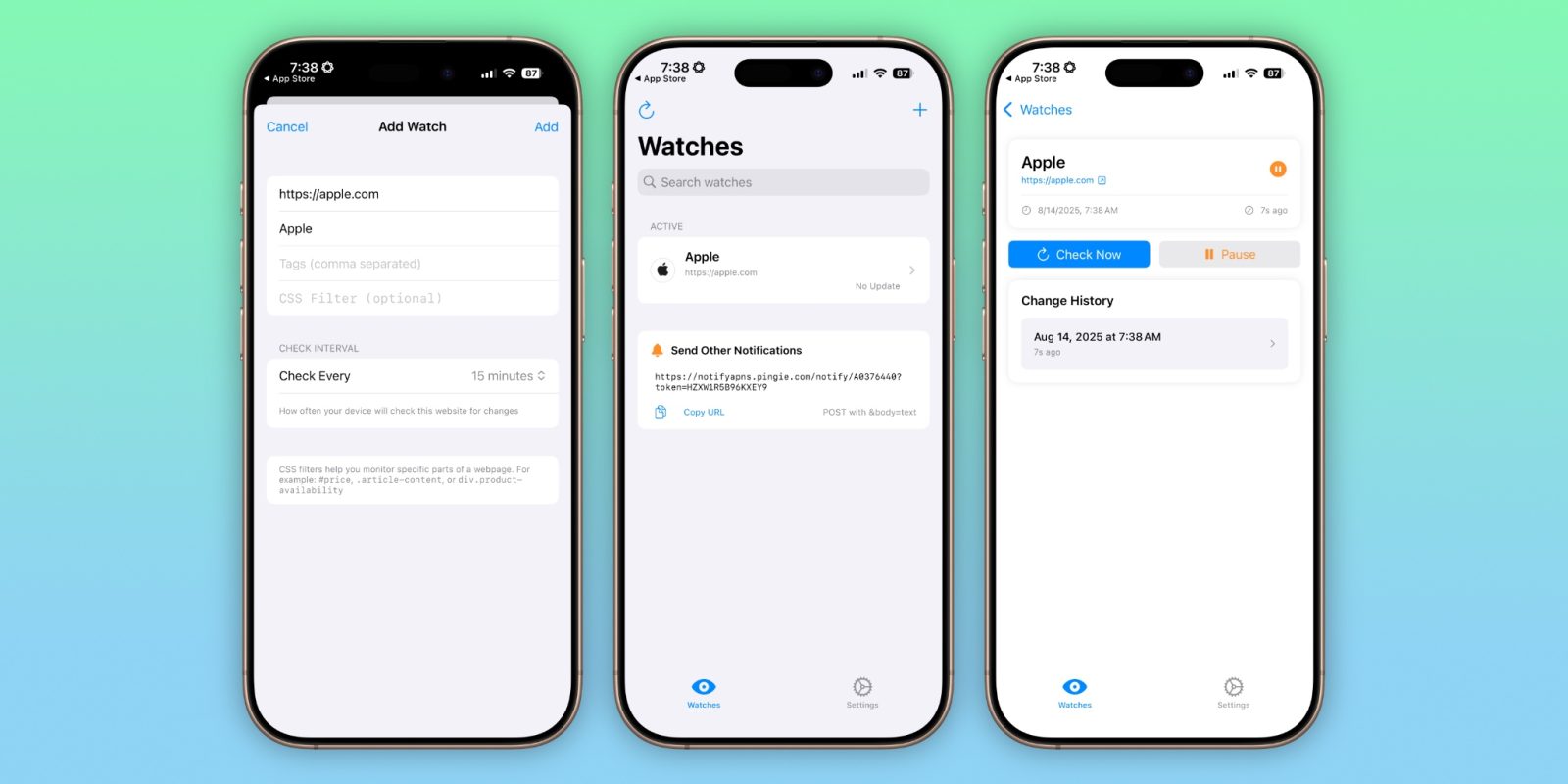
Notify is a simple app for monitoring websites for changes. It’s completely free, private, and local – running fully on your iPhone. The app is a bit niche, but it does its job really well.

more…
Read the whole story
j_k
382 days ago
reply
Share this story
Delete
Next Page of Stories